

Real-time case updates
See where your case stands and what happens next without chasing your law firm for an update.

Kayse keeps you close to your law firm. See case updates, send secure messages, share documents, get quick answers, and find resources chosen for you. Use it on iPhone, Android, or the web.
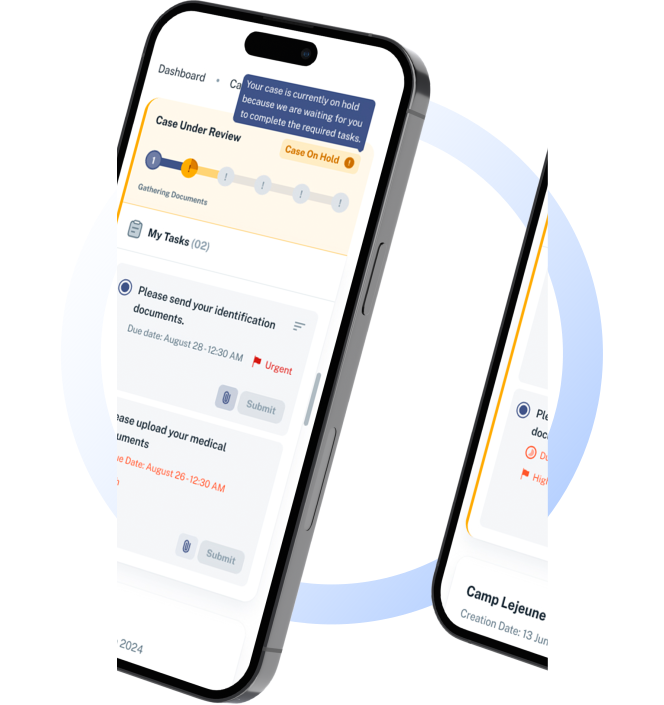
See where your case stands and what happens next without chasing your law firm for an update.
Send a secure message to your legal team and hear back, all in one safe place.
Have a question at midnight? Get a quick, helpful answer any time. Your legal team stays in the loop, and the important things always come from real people.
Watch simple videos that explain your case and what comes next.
Kayse is built for legal teams managing client communication at scale, with a strong fit for mass torts, plaintiff law, immigration matters, and other high-touch case workflows. Clients get a single place for case updates, attorney messages, and clear next steps.
You'll get regular, personal updates through the channels you like best: app notifications, SMS text messages, email, or a phone call.
Kayse is available to clients whose attorneys already use the platform. If your firm is not on Kayse yet, we'd welcome the introduction.
Kayse is a legal client portal app that helps clients stay connected with their law firm through case updates, secure messaging, AI assistance, and personalized resources.
Need help? Use your in-app support link or contact support@kayse.ai and we'll respond quickly.
Kayse uses secure, encrypted connections to keep case updates, messages, and related information synchronized across supported devices and platforms.
Log in to your account and visit the Profile section to update your personal details and notification preferences. If you need help, our support team is here for you.
Kayse is not a law firm, and we can only support clients whose attorneys use the Kayse App. If your attorney does not use Kayse, you can tell them about us.